How to edit domain
Right now the Domain management panel allows you to manage:
- Nameservers of a domain
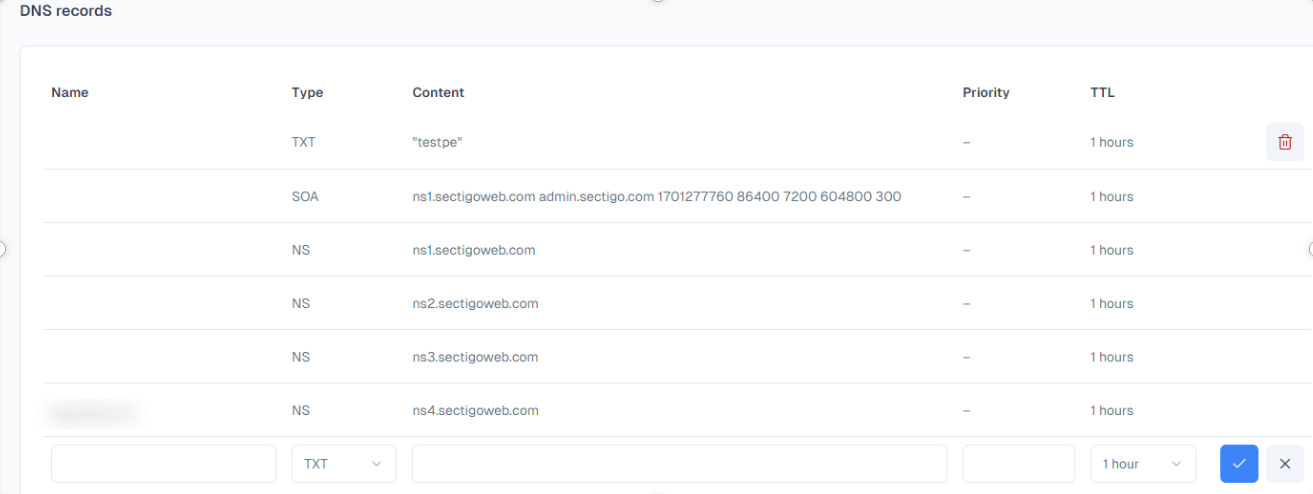
- DNS Records of a domain
1. Managing nameservers of a domain. You may delete, update or add nameservers for a domain. When updating or adding a nameserver - simply add a hostname and if it is valid - the IPv4 will be filled auotmatically.
To save nameservers for a domain - click on "Save" after you finish adding, changing or deleting the nameservers

If the nameservers are from Openprovider or Sectigo you will see a Records table, where you can delete or add nameservers.
Please note that:
- updating DNS Record is not possible - if you want to update a DNS record - delete it and add the one with corrections
- SOA and NS Records can not be deleted
To add a DNS Record click on "Add a DNS record". If you want to add a DNS Record for a root domain - pleasy type the entire domain name (without https://) in the name field. If you wish to add a DNS Record for a subdomain - please type in the entire hostname in the name field.
If you wish to delete a record - click on "Bin" icon.